What it does
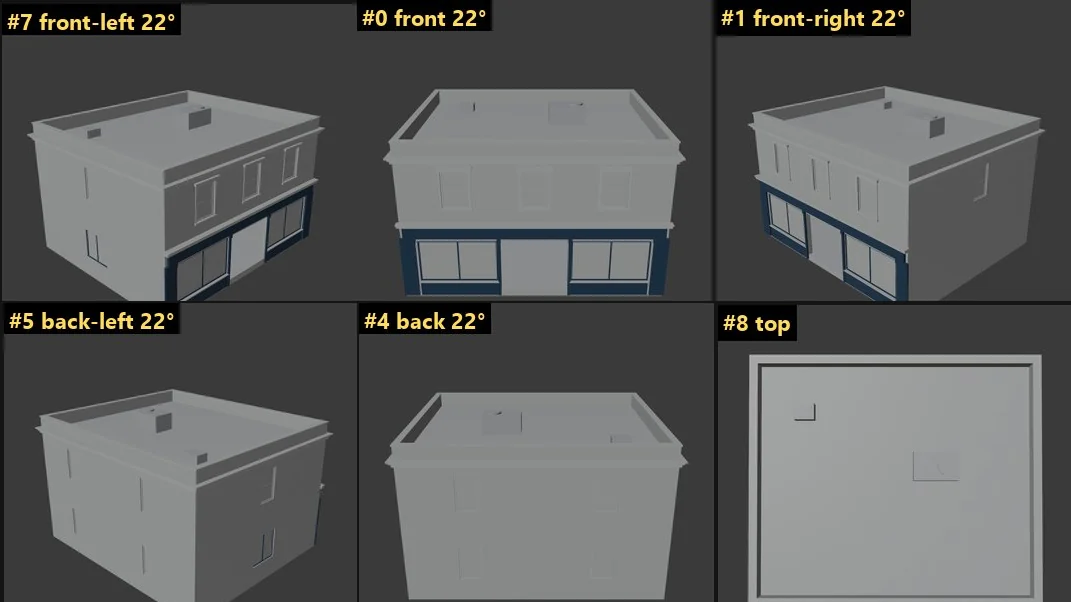
Lets Claude see what the user is showing it, in whatever window or screen it is told to look at (any app: a browser, an editor, a game, Blender, Unreal), without a stream of screenshots. Name the target with app= (an exe name such as chrome, or the aliases blender and unreal), title= (part of the window title) or screen=true / monitor=N for a whole screen; with nothing named, `watch` records the window the user switches to next. `watch` records only that window (or screen) for a few seconds (default 10), then returns one or two contact sheets: keyframes picked by visual change, auto-cropped to the part that moved (the viewport), and capped at about 1.5k tokens per sheet however long the recording. `orbit` needs no user at all: Claude photographs the selected model from 8 angles plus top (a temporary camera in Blender, live or headless on a .blend; a temporary SceneCapture2D in Unreal), so the user's viewport never moves, and gets one ~1.5k-token sheet. Read the returned sheet paths with the Read tool, and use `zoom` for a full-resolution look at one frame. Windows only. Privacy: a window's frames are kept only while it is in front or nothing covers it (a whole screen is recorded only when asked for), a REC badge (excluded from capture) shows while recording, and only the last 10 recordings are kept on disk. PROTOCOL: offer it before using it ('Want me to turn on ClaudeVision? Give me 20 seconds while you orbit the model'), unless the user asks you to look ('claude check this out', 'hey look at this'), in which case run watch for 10 s at once. Run install_skills once for the /claudevision skill with the full protocol.
Capabilities
What it's capable of
Watch
Record what the user is showing for `seconds`: the window or screen named (app=, title=, screen=true or monitor=N), or, with nothing named, the window the user switches to next. A window starts recording once it is in front; a screen starts at once. Blocks: give the shell command a timeout of at least wait_timeout + seconds + 60 s. Returns `read`: image paths to open with Read.
Orbit
Claude photographs the target from set angles by itself: no recording, and the user's view never moves. Blender live (open Blender, through the AI Toolbox bridge), Blender headless (blend=<file>), or Unreal (editor with Python remote execution on). Target: the selection by default. Returns `read`: one sheet of labelled views (front, front-right, ..., top). Solid takes ~3 s; material (EEVEE) takes 30-60 s and freezes Blender's UI while it renders.
Start
Like watch but returns at once (recorder runs in the background). Follow with status, stop, review.
Status
State of a recording (default: the newest). A recording whose recorder died reads state failed, with the reason in error.
Stop
End a background recording early.
Review
Build or rebuild the sheet(s) for a recording (default: the newest), for example with more tiles, another crop or low detail. Waits for a running recording unless wait=false, and never on a recorder that died: a recording that broke off (state error or failed) still gets a sheet of the frames saved before that, with the reason in error.
Zoom
One recorded frame at full resolution (capped at the ~1.5k-token budget), optionally a box of it. Frame numbers are the #N labels on the sheet. By default it uses the same crop as the sheet.
Snap
One still right now, with no waiting and no recording, of the window named by app= and/or title=, or of a screen (screen=true or monitor=N). It needs one of those: it never guesses. Refuses if another window covers the window asked for.
Apps
Every app window ClaudeVision can see right now, and the monitors (debugging).
Sessions
List the kept recordings.
Clean
Delete every recording on disk.
Install skills
Install the /claudevision skill (when and how Claude should use ClaudeVision) into ~/.claude/skills. Restart Claude Code afterwards.
Under the hood
What Claude can ask it to do
watchRecord what the user is showing for `seconds`: the window or screen named (app=, title=, screen=true or monitor=N), or, with nothing named, the window the user switches to next.orbitClaude photographs the target from set angles by itself: no recording, and the user's view never moves.startLike watch but returns at once (recorder runs in the background).statusState of a recording (default: the newest).stopEnd a background recording early.reviewBuild or rebuild the sheet(s) for a recording (default: the newest), for example with more tiles, another crop or low detail.zoomOne recorded frame at full resolution (capped at the ~1.5k-token budget), optionally a box of it.snapOne still right now, with no waiting and no recording, of the window named by app= and/or title=, or of a screen (screen=true or monitor=N).appsEvery app window ClaudeVision can see right now, and the monitors (debugging).sessionsList the kept recordings.cleanDelete every recording on disk.install_skillsInstall the /claudevision skill (when and how Claude should use ClaudeVision) into ~/.claude/skills.

Get ClaudeVision and every other tool
One key and one pasted prompt. The Toolbox keeps itself up to date.
Install with your key